


PlayNest: MP3 Music
5.01.00 Reviews
App Specs
- Version
- 1.0.2
- Updated On
- License
- Free
- Downloads
- 10,000+
- Developer
- SmarTtDev
- Categories
- Music & Audio
- Platform
- Android
Screenshots
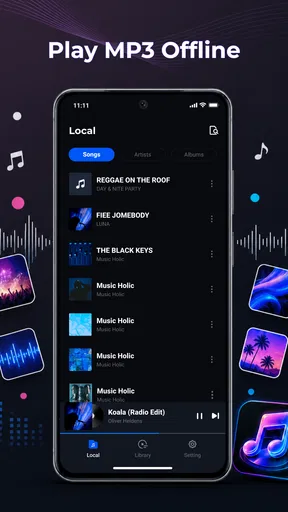
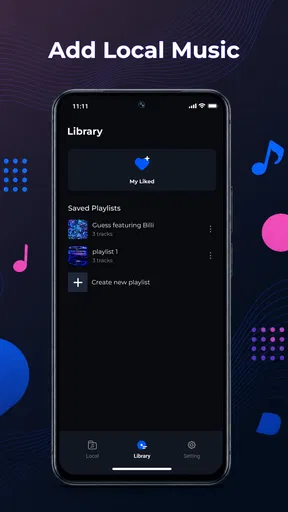
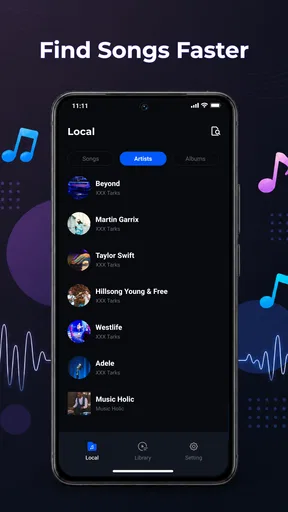
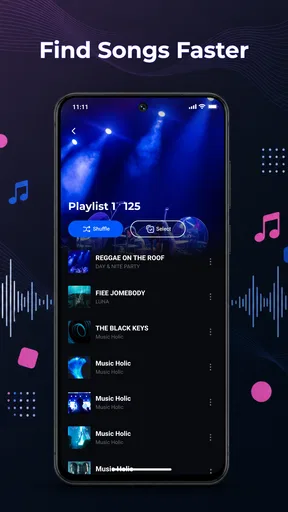
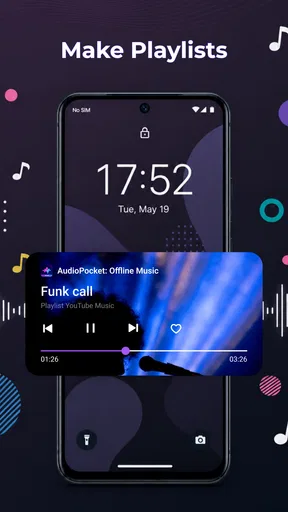
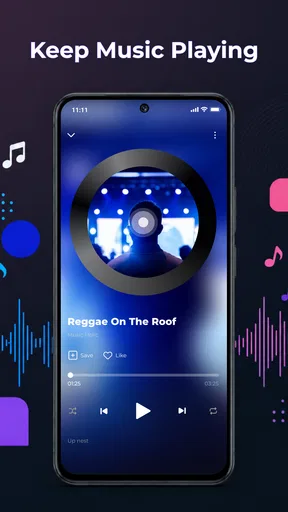
 Analysis by AppCompare
I usually reach for a local music player when I want my listening to feel simple again: choose files, arrange them sensibly, press play, and stop thinking about recommendations or an internet connection. That is the space PlayNest: MP3 Music, an Android music and audio app from SmarTtDev, is aiming at. I spent time looking at it as a practical tool for people who already have MP3 tracks on their device and want a cleaner way to listen to them offline.
The first thing to understand is its focus. This is not trying to be a streaming service, a social music network, or a discovery platform. Its appeal comes from local playback, folder organization, playlists, and controls that remain useful while the app is running in the background. The app is free, carries an Everyone content rating, and currently sits at version 1.0.2. That combination makes it easy to try, especially if your music collection is already stored on an Android phone or tablet.
My overall impression is that PlayNest makes the most sense when your starting problem is disorganized personal audio. If you have albums, language lessons, recordings, or workout tracks scattered across storage, the folder-and-playlist approach can give you a straightforward route from “I know this file is somewhere on my phone” to “I am listening to it without interruptions.” It is less convincing for anyone who expects a large online catalog, automatic discovery, or the deeper library tools found in mature music platforms.
From scattered MP3 files to a usable listening routine
I find the easiest way to make a local player feel useful is to give it a small, clear job before I start listening. I’d begin with one tidy folder and build a playlist for a real routine, such as a commute or a study session, then see whether that setup makes choosing audio feel simpler. That practical starting point leads naturally to how speed and everyday use shape the experience.
The starting point: music that already belongs to you
PlayNest works best when you begin with a clear local collection. That might be a few albums copied from a computer, a selection of purchased MP3 tracks, or a mixture of music and spoken audio saved for travel. The important distinction is that the app’s value comes from managing what is already on the device. It does not replace the process of obtaining or transferring audio; it gives that audio a place to live and a way to play it.
That makes the app particularly appealing before a flight, during a commute through unreliable coverage, or in a situation where you want to avoid streaming data. I like this kind of setup because the listening decision happens once, when I prepare the files, rather than every time I open a music service. For families, students, and people with carefully selected collections, local playback can also feel more predictable than an online library that changes with subscriptions or regional availability.
There is a useful mental shift here: folders are not merely storage locations. They can become practical listening groups. I would separate albums into folders, keep spoken material away from music, and create a dedicated folder for temporary tracks such as a trip playlist. That simple preparation makes the later handoff into playlists much less frustrating.
Worth Reading Before You Choose

Flipboard Shows What News Apps Must Do Beyond the Feed

Switching to Android Auto Means Rethinking Your Driving Routine

Google Calendar Makes a Crowded Week Easier to Manage

Ludo King Makes the Most of the Minutes Between Plans

Baby Panda World Brings Quick Play to Modern Phones, but Its Game Library Feels Busy

ESPN’s Live Game View Makes Following Close Games Easier
Step one: make the file structure work for you
Before opening the player, I would tidy the collection in the file manager. Clear folder names are more valuable than elaborate organization because they reduce the amount of searching needed inside the music app. For example, keeping an album’s tracks together makes it easier to move from browsing to playback without manually rebuilding the same sequence every time.
This is one of the less obvious strengths of a folder-based player: it respects the way you have already arranged your files. A streaming app generally wants you to think in terms of artists, albums, and its own saved library. PlayNest is more useful when your real-world organization does not perfectly match those categories. A folder for “evening listening,” “podcasts saved as MP3,” or “practice material” can be more meaningful than formal music metadata.
The trade-off is that a folder structure requires a little discipline. If files have vague names or are spread across several locations, finding the right track can still take work. The app can make playback easier, but it cannot turn a chaotic collection into a perfectly curated library without some preparation from you.
Step two: move from browsing to playback
Once the files are ready, the natural workflow is to browse the folders, select something familiar, and begin listening. This is where the app’s uncomplicated design matters. I do not need a recommendation engine to play an album I already chose, and I do not need to wait for a connection before hearing a track saved locally.
For a short session, playing directly from a folder is probably the quickest route. If I am preparing a longer routine, playlists become more useful. I can gather tracks from different folders into a focused sequence, such as a walking mix or a set of calm songs for reading. The benefit is not just convenience; it separates the physical location of a file from the reason I want to hear it.
That separation creates a helpful workflow. The folder answers, “Where is this track stored?” The playlist answers, “Why am I listening to these tracks together?” Keeping those two jobs distinct prevents me from duplicating files simply because I want them in more than one listening context.
Step three: use background controls during ordinary tasks
The background controls are important because music rarely stays inside the app window. I might start an album, lock the phone, and continue walking. I might switch to a notes app while listening to study material, or pause a track when someone speaks to me. In those moments, a local player is only useful if playback remains manageable after I leave its main screen.
PlayNest is designed around that kind of use. Its background controls let the listening session fit around another activity instead of demanding constant attention. This is especially practical for hands-free situations, although I still prefer to set up the queue before beginning anything that requires concentration or movement.
A small but valuable habit is to build the playlist before leaving home rather than searching while outside. It reduces screen time, avoids unnecessary interruptions, and makes the offline advantage more meaningful. For a morning walk, I would prepare the sequence the night before, open the app once, and then rely on the background controls while the phone remains in my pocket.
The handoff between folders, playlists, and daily life
The most important handoff in this workflow is from storage to intention. A folder is a technical arrangement, while a playlist is a personal decision. PlayNest supports both, so I can keep files grouped by album or source while creating a separate listening order for a particular task.
There is another handoff between the app and the operating system. Once playback moves into the background, the experience depends on how naturally the phone lets me control an active audio session. This is where a player earns its place in daily use: not when I am staring at its interface, but when I am locking the screen, changing tasks, or returning to the music after a pause.
I also see a handoff between preparation and reliability. Offline playback removes the uncertainty of signal strength, but it makes local file management more important. If I forget to copy a track before traveling, no player can solve that problem. The practical lesson is to treat the app as the final stage of a small preparation routine, not as a replacement for organizing the source files.
A realistic everyday scenario
Imagine I am leaving for a weekend trip with a phone containing several albums, a folder of language lessons, and a few long audio files. I would first keep those groups separate so that a random shuffle does not place a lesson between two songs. Then I would create a playlist for the journey, another for the return trip, and leave the original folders intact as a backup structure.
On the day of travel, I could start the first playlist before entering an area with poor reception. During the journey, background controls would let me pause for announcements or resume without reopening the full player. If I later want a specific album, I can return to its folder rather than dismantling the travel playlist. That is a modest workflow, but it shows why the combination of folders and playlists is more useful than either feature alone.
The same approach works for exercise, study, children’s bedtime audio, or a collection of downloaded interviews. The key is to create playlists around activities while using folders to keep the underlying files understandable. In my experience, that division prevents the common mistake of treating one giant playlist as both a filing cabinet and a listening queue.
What the result feels like
When the collection is prepared properly, the result is pleasantly direct. I can open a folder, choose a track, or select a playlist and listen without turning the session into a search exercise. The app’s free price also lowers the risk of testing it with a small collection first. If it fits the way I store music, I can gradually move more of my offline listening into it.
PlayNest has also attracted a 5.0 average from 23 ratings, with 10K+ installs. Those figures suggest that the app has found an audience, although I would not treat a small rating pool as proof that every device or collection will behave identically. I would use the rating as encouragement to try it, not as a reason to ignore the practical question of whether local MP3 playback matches my habits.
Its release date is Jul 6, 2026, and the minimum operating system is Android 8.0. That makes compatibility a straightforward checkpoint: anyone using an older Android version should not assume it will run, while users on supported versions can approach it as a lightweight local-player option. The current version, 1.0.2, also makes me view it as a focused tool rather than a platform with years of accumulated library complexity.
Where the workflow breaks down
The same simplicity that makes PlayNest approachable can become a limitation. If you want cloud synchronization, a huge searchable catalog, algorithmic recommendations, lyrics, podcasts from online sources, or a shared music profile, this is probably not the right destination. A streaming service is better when discovery and access to new material matter more than control over local files.
It may also be a poor fit for someone who expects the app to repair inconsistent metadata automatically. Folder browsing is forgiving when your folders are meaningful, but it is less forgiving when your collection contains duplicate names, missing album information, or tracks saved in several unrelated places. In that situation, a more advanced library manager may justify its extra complexity.
There is a practical limitation in the offline promise as well. Offline playback is convenient only after the files are actually present and usable on the device. I would test the complete journey before relying on it for a long trip: open the intended playlist, start a track, lock the screen, pause and resume through the background controls, and check that the sequence contains what I expect. This is not a criticism unique to PlayNest; it is the sensible final check for any local audio workflow.
Another point is scale. A small or medium collection is easy to understand through folders and playlists. A very large archive may eventually make manual organization feel tiring, especially if I want sophisticated sorting or automatic grouping. In that case, a mature desktop library system or a feature-heavy mobile player could be a better handoff point, with PlayNest reserved for a selected offline subset.
Who should install it
I would recommend PlayNest to Android users who already own MP3 files and want a clean, free way to play them without depending on streaming. It is a strong match for people who think in folders, travelers preparing audio in advance, students carrying lessons locally, and listeners who prefer to decide what belongs in their library.
I would be more cautious if your main goal is finding unfamiliar music. The app is built around the tracks you bring to it, so its usefulness grows with the quality of your own collection and organization. Someone who wants instant access to new releases, personalized radio, or synchronized listening across several services will probably be happier with a streaming alternative.
The Everyone age rating also makes it an uncomplicated choice for general household use, but the real deciding factor is not age. It is ownership and workflow. If “my music” means files stored on my device, PlayNest is relevant. If it means a constantly changing online catalog, it is solving a different problem.
My final take after following the full workflow
PlayNest: MP3 Music succeeds by keeping the path from local file to active listening short. I can organize folders, shape playlists around real activities, and continue playback while doing something else. That is enough to make it useful, particularly when I want predictable offline audio rather than another service competing for my attention.
I would not call it a universal music solution. Its value depends on having MP3 tracks ready, and its focused design may feel limited beside a full streaming platform or an advanced library manager. Still, for the person who wants a straightforward offline player from SmarTtDev, the free download is easy to justify. The best reason to choose PlayNest is not the size of its feature list, but the control it gives you over a collection you already own.
My advice is to begin with one well-organized folder and one purpose-built playlist. Try the complete routine: select the files, start playback, lock the device, use the background controls, and return to a different folder afterward. If that handoff feels natural, the app will likely become a dependable part of your offline listening routine. If you find yourself wanting online discovery, automatic cataloging, or cross-service access, you will know early that another kind of music app suits you better.
For my own use, that clarity is the deciding point. PlayNest does not need to be everything. As a focused offline MP3 player with folders, playlists, and background listening, it offers a practical answer to a specific everyday problem: making personal audio easy to reach when the internet, a recommendation feed, or a complicated library is simply unnecessary.
Pros
- Simple interface makes browsing and playing local music straightforward.
- Supports offline playback without requiring a mobile data connection.
- Useful playlist tools for organizing tracks by mood or activity.
- Quick search helps locate songs
- artists
- and albums efficiently.
- Lightweight design can work well on phones with limited storage.
Cons
- May lack the advanced audio controls found in premium music players.
- Compatibility with unusual audio formats may be limited.
- Album artwork and track metadata may not always display correctly.
- Background playback could vary depending on device battery settings.
- The app may offer fewer discovery features than major streaming services.
FAQs for PlayNest: MP3 Music
What is PlayNest: MP3 Music, and what can I use it for?
PlayNest: MP3 Music is designed as a mobile audio player for organizing and listening to music files stored on your device. Depending on the version and platform, it may offer features such as playlists, background playback, repeat and shuffle modes, album or artist browsing, and basic playback controls. It is best suited to users who already have legally obtained MP3 files and want a simple way to manage their personal music library.
Can PlayNest: MP3 Music stream songs online or download music?
You should not assume that PlayNest: MP3 Music provides access to a full commercial streaming catalog or allows unrestricted music downloads. Its main purpose appears to be playing locally available audio files, although supported online features can vary between releases. Before installing, check the current store description and permissions carefully, especially if you expect offline downloads, cloud synchronization, radio stations, or access to subscription-based music services.
Does PlayNest: MP3 Music work without an internet connection?
A local MP3 player can generally continue playing music without an internet connection once compatible audio files are stored on the phone. This makes PlayNest: MP3 Music potentially useful during travel, in areas with weak reception, or when you want to avoid mobile data usage. However, features such as advertisements, online artwork, updates, account services, or any streaming-related tools may still require connectivity.
Which audio files and devices are compatible with PlayNest: MP3 Music?
Compatibility depends on the operating system and the specific app version, but MP3 files are normally the primary format supported by an application with this name. Some releases may also recognize formats such as AAC, WAV, or FLAC, while others may be more limited. On Android and iOS, file access works differently, so review the stated requirements and test a few personal files before moving your entire library.
Is PlayNest: MP3 Music free, and are there advertisements or in-app purchases?
The download may be free, but that does not necessarily mean every feature is available without limitations. PlayNest: MP3 Music could include advertising, optional purchases, premium controls, or other monetization features depending on the store version and region. Check the app listing for pricing, subscriptions, and purchase details before downloading. Also review requested permissions and privacy information so you understand how your data and music library may be handled.


